School Brushes Procreate Stamps Guide
Digital planning and educational content creation have evolved rapidly, moving from simple note-taking to complex, visually engaging designs. For educators, students, and creative professionals using the iPad, the right tools can significantly reduce the time spent on repetitive tasks while enhancing the aesthetic quality of their work. The School Brushes Procreate Stamps collection represents a specialized set of digital assets designed to streamline this process. By integrating a comprehensive library of educational icons and planner elements directly into your workflow, you can focus more on the substance of your content rather than the mechanics of drawing every individual element.
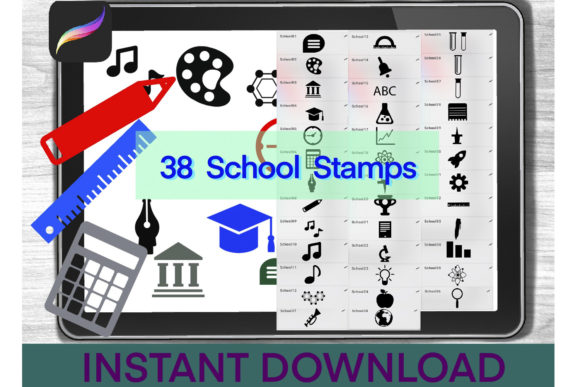
This set of 38 school stamps is not merely a collection of clipart; it is a functional toolkit for anyone involved in digital education, lesson planning, or academic journaling. Whether you are a teacher creating interactive worksheets, a student organizing study schedules, or a designer developing educational materials for clients, these brushes offer a practical solution to common design challenges. The value lies in the immediacy and consistency they bring to your projects, allowing for a polished look without requiring advanced illustration skills.
Enhancing Efficiency in Digital Planning
One of the primary benefits of using School Brushes Procreate Stamps is the significant reduction in production time. In traditional digital planning, creating consistent icons for subjects like mathematics, science, literature, or art requires either drawing each icon from scratch or searching through disparate libraries for matching styles. This fragmentation often leads to visual inconsistency and wasted hours. With a dedicated set of planner doodle Procreate brushes, you have a cohesive visual language at your fingertips.
Consider the scenario of a homeschool parent or an educator preparing weekly lesson plans. Instead of spending thirty minutes sketching books, pencils, calculators, and globes, you can simply select the appropriate stamp from your brush library. This efficiency allows you to allocate more time to curriculum development or student interaction. The stamps are designed to be intuitive, meaning they integrate seamlessly with the Apple Pencil’s pressure sensitivity if configured correctly, or function as static stamps for quick placement. This dual functionality supports both rapid prototyping and detailed customization.
Professional Quality for Educational Content
For freelancers and small business owners who create educational resources, presentation matters. Clients and end-users associate high-quality visuals with credibility and professionalism. The School Brushes Procreate Stamps provide a uniform style that elevates the perceived value of your digital products. When you sell printable planners, digital stickers, or educational guides, the consistency of your graphics plays a crucial role in brand identity.
These brushes are particularly useful for creating thematic bundles. For example, if you are designing a back-to-school planner, you can use the included stamps to create section dividers, habit trackers, and goal-setting pages that all share the same artistic DNA. This coherence makes the final product feel curated and thoughtful. Moreover, because the files are optimized for Procreate, they maintain clarity on high-resolution iPad screens, ensuring that your designs look crisp whether viewed on a tablet or printed out for physical use.
Technical Requirements and Compatibility
To make the most of these digital tools, it is essential to understand the technical environment in which they operate. The School Brushes Procreate Stamps are specifically engineered for the Procreate app on iPad. Therefore, the primary requirements are an iPad compatible with the latest versions of Procreate, an Apple Pencil or a compatible stylus for precise navigation, and the Procreate application itself. While a stylus is not strictly necessary for importing the files, it is highly recommended for the actual design work to ensure accuracy and ease of use.
It is important to note that these brushes are not compatible with other drawing applications such as Adobe Fresco or Clip Studio Paint unless those apps support specific Procreate brush formats, which is rare. Users should ensure their iPadOS and Procreate app are updated to avoid any compatibility issues during the import process. This specificity ensures that the brushes perform optimally, leveraging Procreate’s unique engine for rendering strokes and stamps.
Step-by-Step Installation Guide
Installing digital brushes can sometimes be a confusing process for new users. However, with the School Brushes Procreate Stamps, the procedure is straightforward if you follow the correct steps. The files are delivered in a zipped format to preserve data integrity during download. Here is how to properly install them:
- Download the Files: After your purchase, locate the download link and save the file to your iPad. It will typically appear in your Downloads folder within the Files app.
- Unzip the Archive: Open the Files app and navigate to the Downloads section. Locate the zipped file you just downloaded. Tap on it once to preview, then select the "Unzip" option. This will extract the contents into a new folder.
- Import into Procreate: Open the unzipped folder and find the .brushset file. Tap on it, then select "Share" or "Open in." From the list of available apps, choose Procreate. The app will open automatically, and the brushes will be installed into your current brush library.
- Verify Installation: Once inside Procreate, open the Brush Library. You should see a new category or a set of brushes labeled with the school theme. Test a few stamps on a blank canvas to ensure they are functioning correctly.
If you encounter issues, ensure that you are not trying to open the file directly from a cloud storage preview without downloading it first. The local file system on the iPad must have access to the unzipped data for Procreate to read it properly.
Understanding Licensing and Commercial Use
A critical aspect of purchasing digital assets is understanding the licensing terms. With the School Brushes Procreate Stamps, commercial use is allowed. This means you can incorporate these stamps into designs that you sell, such as digital planners, printed worksheets, or marketing materials for your educational business. This flexibility is vital for entrepreneurs and creators who rely on selling their creative output.
However, there are clear restrictions to protect the intellectual property of the creator. You cannot re-sell the digital file itself. This means you cannot package the brush set and sell it as a standalone product, nor can you share the original files with others or distribute them freely. The license is for your use only. This distinction is important: you are buying the right to use the tools to create new works, not the right to redistribute the tools themselves. Adhering to these terms ensures a fair ecosystem for digital artists and developers.
Maximizing Creativity with Planner Doodles
Beyond mere efficiency, these tools can spark creativity. The Planner Doodle Procreate Brushes included in the set encourage experimentation. You might combine a math symbol stamp with hand-lettered notes to create a unique study guide header. Or, you could layer multiple stamps to create complex scenes for storytelling in educational apps. The limitation of 38 stamps is actually a benefit, as it forces you to think creatively about how to reuse and repurpose existing elements rather than relying on an endless, overwhelming library.
For hobbyists and journaling enthusiasts, these stamps add a layer of personalization to daily logs. Tracking homework, extracurricular activities, or reading goals becomes visually engaging when accompanied by relevant icons. This visual reinforcement can improve retention and motivation, making the planning process less of a chore and more of a creative outlet.
In conclusion, the School Brushes Procreate Stamps offer a blend of practicality and aesthetic appeal for anyone working in the educational or planning space on iPad. By simplifying the design process and providing professional-grade assets, they allow users to produce higher quality work in less time. Whether you are an educator looking to enhance your materials or a designer building a product line, these tools provide a solid foundation for your digital creativity.